

 Loading...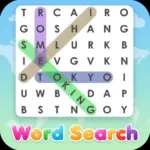
















Play Word Search - Word Search Puzzle Game online for free, test your vocabulary and sharp eyes in a thrilling word-finding adventure! This classic game challenges you to hunt for hidden words within a grid of letters, offering a fun and brain-boosting experience. Enjoy simple click-and-drag or tap-and-swipe controls, making it easy to play on any device.
Whether you're playing on a phone, tablet, or computer, Word Search - Word Search Puzzle Game is packed with hundreds of puzzles, exciting themes, and new words to discover. Expand your knowledge and sharpen your focus with every completed grid.
Ready to become a word-finding champion?
Discover More About Word Search
Word Search is an exciting classic and relaxing word puzzle game. Initially, widespread browser iterations began appearing widely in the early 2000s, and it quickly became popular among players and earned a timeless favorite, loved by millions for its engaging and educational gameplay.
Created by the talented team at Softgames, who is known for creating a wide variety of fun and accessible browser games, Word Search offers a seamless experience on desktops, tablets, and mobile phones, crafted with simple, intuitive gameplay with broad appeal to ensure players have a great time wherever they play.
With its endless supply of word grids, themed challenges, and satisfying discovery, Word Search continues to be a favorite among fans of word puzzle and brain-training games, cementing its place as one of the top casual puzzle games!
Explore Word Search Gameplay
| Gameplay Overview | Word Search is fun for beginners and a stimulating brain workout for experts! The game starts with a grid of letters and a list of words to find, and as you progress, grids grow larger, word lists become longer, and themes introduce new vocabulary. Your main goal is to locate and highlight every hidden word before time runs out, requiring key skills like sharp observation, quick thinking, and strong vocabulary skills. |
|---|---|
| Progression and Features | The game offers a level-based progression system that increases in difficulty over time. It includes special features like themed categories, different grid sizes, and sometimes hint options, setting it apart from other games in its category. |
| Gameplay Mechanics | Players scan the grid vertically, horizontally, diagonally, and even backward to spot words. Once a word is found, they click (or tap) the first letter, drag across the letters of the word, and release at the last letter to highlight it. Players can collect bonus points for speed or finding extra hidden words and unlock new themes or difficulty settings, with improvements affecting gameplay in the following ways: these unlocked features offer fresh challenges and keep the game exciting. |
| Advanced Gameplay | As you advance, you’ll encounter larger grids, trickier word placements, and sometimes timed challenges. Your skills will directly impact your success, as your speed and accuracy in identifying words will directly determine your score and ability to conquer harder levels. |
Available on All Devices
| Platforms | You can play this game directly in your web browser, whether you're using a desktop, laptop, tablet, or mobile device. |
|---|
Mastering Word Search: A Guide
In Word Search, your primary goal is to find all the hidden words listed at the side of the grid. As you advance, you’ll face challenges like tricky word placements, letters that blend into false words, and sometimes a ticking timer. To succeed, you need to scan systematically, look for common letter combinations, and tackle easier words first to clear up the grid.
As you progress, the difficulty increases, offering new levels and obstacles to overcome. Along the way, you'll find bonus points, hints, or unlocking new themed puzzle packs, which will help boost your performance. However, be mindful of the failure conditions—if you run out of time before finding all words, or fail to identify enough words, you’ll have to restart from the current puzzle or try a new one.
The game’s ultimate goal is to clear challenging grids, expand your vocabulary, and achieve high scores. Throughout your journey, you'll unlock new puzzle themes, harder difficulties, and a sense of accomplishment, keeping you motivated to keep playing and achieve higher scores.
Controls
Word Search uses simple and intuitive mouse or touch controls. Here's how you control the word-finding action:
| Platform | Controls |
|---|---|
| On Computer: |
|
| On Mobile: |
|
The controls for Word Search are super easy to learn, making it accessible for everyone to jump right in and start searching for words!
Helpful Tips and Strategies for Word Search
Want to become a true Word Search master in Word Search? These simple and helpful tips will improve your word recognition, pattern spotting, and overall puzzle-solving speed and help you unlock cool rewards:
| Tip Category | Actionable Advice |
|---|---|
| Systematic Scanning | Start by scanning rows left-to-right, then columns top-to-bottom, then diagonals to ensure you don't miss anything. |
| Spot Unique Letters | Look for less common letters like Q, X, Z, J, and K first. Words containing these letters often stand out more. |
| Beginning & Endings | Simultaneously look for both the first and last letters of the words on your list in the grid. |
| Use Themed Clues | If the puzzle has a theme (e.g., "Fruits"), think of related words that might be hidden. This narrows your mental search. |
| Perimeter Power | Many words are frequently hidden along the outer edges of the grid, so scan the border thoroughly. |
| Take a Mental Break | If you get stuck, take your eyes off the screen for a minute. A fresh perspective can help you spot missed words. |
| Remember All Directions | Don't forget words can be hidden horizontally, vertically, diagonally, AND backwards! |
| Practice Regularly | The more Word Search puzzles you complete, the faster your eyes will become at spotting tricky word placements. |
Follow these tips and you'll be unbeatable at finding words!
Features of Word Search
Word Search is a classic brain-teasing puzzle game designed for players of all ages. Below are the top features that make this game so enjoyable and addictive:
- Multiple Difficulty Levels: Choose from easy (small grids, short words) to expert (large grids, complex words, timers) to match your skill level.
- Diverse Themes & Categories: Explore puzzles based on animals, food, sports, science, countries, and more, keeping gameplay fresh and exciting.
- Untimed & Timed Modes: Play at your own pace for relaxation or challenge yourself against the clock for speed and high scores.
- Intuitive Touch/Click Controls: Simple and smooth drag-to-select mechanics make finding words a breeze on any device, from desktop to mobile.
- Daily Challenges: Enjoy new puzzles available every day to keep players engaged and test their word-finding skills regularly.
- Hint System: Get a little help when you're stuck on a tricky word, perfect for younger players or when you need a gentle nudge.
- Progress Tracking: See your stats, completed puzzles, and improvement over time, encouraging continued play and skill development.
- Educational Benefits: Boost vocabulary, improve spelling, and enhance pattern recognition skills in a fun and engaging way.
These features make Word Search a perfect game for anyone who loves a fun challenge for their mind, improving vocabulary, and enjoying a relaxing game!
Game Details
| Developer | Softgames |
|---|---|
| Release Date | Early 2000s |
| Genre | Word Puzzle, Educational |
| Platform | Web browser, Mobile (Android, iOS) |
| Mode | Single-player |
Play Word Search Online
Word Search online offers a special version of the beloved word puzzle game that you can enjoy directly on our website. This version has been optimized for seamless play, so you don’t need to download or install anything to get started!
Start playing Word Search with just one click! It’s compatible with all major web browsers, including Google Chrome, Mozilla Firefox, Microsoft Edge, Safari, and Opera. Whether you’re on a computer, tablet, or smartphone, the game adjusts perfectly to your device for a smooth experience.
This online version of Word Search has been specially designed to deliver the best gameplay without compromising on performance or safety. All the excitement of the original game is preserved, ensuring a fast, secure, and enjoyable experience across all browsers.
Play Word Search for Free
Word Search for free is available to play right here on our website, offering an exciting modified version of the original game. You can dive into the action without any cost—no downloads or hidden charges, and there are absolutely no in-game purchases required.
Everything in Word Search, from every puzzle, every theme, and every difficulty level, is fully accessible without paying a dime. Whether you're a kid or an adult, you can enjoy endless fun without spending a single coin!
What's more, every game on our site is 100% free to play. We’re committed to providing a gaming experience that’s free of limits or costs. Just pick a game and start playing instantly, no strings attached!
Can You Play Word Search Unblocked?
Yes! You can play Word Search unblocked for free anytime on Unblocked Games. Our platform ensures that whether you are at school, in class, or at work, the game remains accessible without filters or restrictions.
Many players search for Word Search unblocked 76 or 6x because these platforms are known for bypassing network blocks. This version of the game is powered by HTML5, meaning it requires no Flash and no download to run smoothly in any modern browser on PC, Chromebook, or mobile devices.
Where to Play Word Search Unblocked?
If you are looking for the best mirrors to enjoy Word Search without restrictions, these top-rated repositories are excellent choices:
- Unblocked Games 76: A premier source for high-quality titles like Word Search, known for its clean interface and fast loading times.
- Unblocked Games 6x: Perfect for classroom gaming, offering Word Search unblocked with a focus on safe, logic-based fun.
- Unblocked Games 66 & 67: These "EZ" sites provide no-download versions of Word Search, ideal for quick gaming sessions during breaks.
- Unblocked Games G+ & 77: Great alternatives if other mirrors are blocked by your school's administrator, featuring a robust collection of puzzle and arcade titles.
How to Play at School:
- Navigate to unblockedgames.pl.
- Search for Word Search in the search bar.
- Click "Play Now" to launch the HTML5 unblocked version.
- Enjoy spotting hidden words and expanding your vocabulary without worrying about firewall blocks!
Word Search GitHub
Many players search for Word Search GitHub versions to bypass blocks that prevent them from playing the game at school or work. While GitHub might offer some alternatives, it's often complicated and not always reliable.
But with our website unblocked Games , you don't need to search for GitHub versions anymore. Our version of Word Search runs smoothly on all devices and networks. Whether you're in the classroom, office, or on a break — enjoy the full game online with no restrictions, no downloads, and completely for free!
Word Search Download
Many fans of Word Search love to download the game to their own devices for a better playing experience than just playing on the browser. Here's how you can do it:
- If your device runs on Android, just go to the Google Play Store and tap the install button to download the game.
- If you use Apple devices like iPhone or iPad, head to the Apple App Store and press the install button to get the game.
APK Word Search
If you use an Android device but can't find the game in the Google Play Store, don't worry! You can search for the Word Search APK file online and download it directly to your device. This way, you can install the game without using Google Play.
Also, if you love playing on your computer, you can download Word Search for free from the Steam store. This lets you enjoy the game with better controls and graphics.
Word Search Extension
Many fans of Word Search prefer to play the game directly on their browser using a Google Chrome extension. This lets them start playing instantly without having to visit the website every time. Plus, some extensions allow you to play offline whenever you want. To download the Word Search extension, click here.
Similar Games to Word Search
- Tap Road
- Stickman Slash
- Head Soccer 2024
- Bounce Up
- Sudoku
- Mini Crossword
- Moto Racer
- Super Tic Tac Toe
- Get 10
- Dots and Boxes
- Pirates Match 3
- Poptris
- Love Tester
- Dunk Frenzy
- Tetra Block
- Shovel Pirates
- Sprunki Phase 9
- Magikmon
- Tunnel Rush 2
- Eagle Ride
- Burnin Rubber 5 XS
Find More Games by Category
What are the benefits of playing Word Search?
Word Search helps improve vocabulary, spelling, concentration, and pattern recognition, offering a fun mental workout for players of all ages.
How to get better at Word Search puzzles?
Practice scanning systematically, look for less common letters, and tackle easier words first to build momentum and improve your speed.
Is Word Search good for my brain?
Yes, Word Search is excellent for your brain! It stimulates cognitive functions like memory, focus, and problem-solving skills.
Can I play Word Search on my phone?
Absolutely, Word Search is optimized for mobile devices, allowing you to play easily with tap-and-drag controls on your phone or tablet.
What's the goal of a Word Search game?
The primary goal is to find and highlight all the hidden words from a given list within a grid of letters.
Are there different types of Word Search puzzles?
Yes, Word Search puzzles come in various themes, grid sizes, difficulty levels, and sometimes include timed challenges or special features.
How long does a Word Search puzzle usually take?
The time taken varies by difficulty, but most puzzles can be completed in 5-15 minutes, making them perfect for quick breaks.
Can I play Word Search offline?
The browser version requires an internet connection, but some downloadable apps or extensions might offer offline play.
What skills does Word Search improve?
Word Search improves vocabulary, spelling, observational skills, focus, patience, and visual scanning abilities.
Is Word Search educational for kids?
Definitely! It's a fantastic educational tool for children to learn new words, improve spelling, and develop pattern recognition in a fun way.
Where can I find free Word Search games online?
You can find many free Word Search games on browser game platforms like unblockedgames.pl, which offers direct play without downloads.
How do you highlight words in Word Search?
On a computer, click the first letter and drag to the last; on mobile, tap the first letter and drag your finger to the last letter.
Are Word Search puzzles timed?
Some Word Search games offer timed modes for an extra challenge, while others provide a relaxed, untimed experience.
Do Word Search games have hints?
Many online Word Search games include a hint system that can reveal a letter or the location of a word when you're stuck.
What are common strategies for Word Search?
Common strategies include scanning methodically, focusing on unique letters, and looking for words around the perimeter of the grid.
Can Word Search help with spelling?
Yes, by repeatedly seeing and identifying words, Word Search can significantly reinforce correct spelling for players.
What's the best way to start a Word Search puzzle?
A good way to start is by quickly scanning for shorter words or words with distinct letters, then moving to longer, more complex ones.
Why is Word Search so popular?
Word Search is popular because it's easy to learn, relaxing yet stimulating, and offers a satisfying feeling of accomplishment when puzzles are solved.
How to make Word Search puzzles harder?
To make them harder, choose larger grids, longer word lists, obscure themes, or try playing in a timed mode.
Can I customize my Word Search game?
Some advanced Word Search games allow customization of themes, background colors, or even creating your own puzzles.
Frequently Asked Questions (FAQ) About Word Search
-
What is Word Search?
Word Search is a game where you need to find all the hidden words within a grid of letters. -
How do I play Word Search?
Use the mouse or touch controls to click (or tap) on an icon, drag to its pair, and release to create a line. -
Is the game free?
Yes, Word Search is free and accessible directly in the browser. -
On which platforms can I play?
The game is available on web browser, as well as on Android and iOS mobile devices. -
Do I need an account to play?
No, you can start immediately without an account. -
Is the game suitable for children?
Yes, Word Search is designed for all ages and features age‑friendly graphics. -
Are there difficulty levels?
Yes, the game gets harder as you progress through levels. -
How do I progress to the next level?
You need to find all the hidden words within a grid of letters to move to the next level. -
Can I replay a level?
Yes, you can replay all levels at any time. -
Is the game multiplayer?
No, Word Search is a solo game. There is no multiplayer mode included. -
Are there any tips for success?
Scan systematically, look for less common letters, and tackle easier words first. -
How can I improve my skills in the game?
Practice regularly, learn the patterns of each level, and use the undo button strategically to refine your routes. -
What do I do if the game is lagging or crashing?
Try clearing your browser cache, updating your browser, or playing on a different device with a stable internet connection. -
Can I play without an internet connection?
No, this game requires an internet connection to be played directly in the browser. -
How do I earn rewards or bonuses?
You can earn rewards by completing certain levels, reaching high scores, or collecting special icons that appear in bonus stages. -
What happens when I lose all my lives?
You can either restart from the last checkpoint or use an earned power‑up to continue without losing progress. -
How often does the game get updated?
The game receives regular updates with new content, bug fixes, and performance improvements. Check the game website for details on upcoming updates. -
Can I customize my character or plane?
While the game doesn’t offer deep character customization, you can unlock different board backgrounds or icon skins by completing milestones. -
How do I unlock new levels or stages?
New levels unlock automatically after completing the previous level or by earning specific achievements. -
Is there any way to save my progress?
Yes, your progress is automatically saved through your browser’s local storage. If you want a backup, you can link a game account (if available).
What are the different directions words can be hidden?
Words in Word Search can be hidden horizontally, vertically, diagonally, and in reverse order in all these directions.
Is there a timer in Word Search puzzles?
Some Word Search puzzles include a timer to add an extra challenge, while others are untimed for a more relaxed experience.
Can I play Word Search with friends?
Word Search is primarily a single-player game, but you can compete with friends by comparing scores or seeing who can solve a puzzle faster.
What if I can't find a word?
Most online Word Search games offer a hint button that will help you locate a difficult word or reveal a starting letter.
Are Word Search games suitable for all ages?
Yes, Word Search games are enjoyed by players of all ages, from young children learning new words to adults looking for a relaxing brain exercise.
Does playing Word Search help with vocabulary?
Absolutely, playing Word Search exposes you to new words and reinforces existing ones, significantly boosting your vocabulary.
How do I choose the right difficulty level?
Start with an easy level to get comfortable with the mechanics, then gradually increase the difficulty as your word-finding skills improve.
Are there any special features in online Word Search games?
Many online versions include themed categories, customizable grids, daily challenges, and sometimes even options to create your own puzzles.
Can Word Search be addictive?
Yes, the satisfying feeling of finding hidden words and completing puzzles can make Word Search quite an addictive and enjoyable pastime.
What is the history of Word Search puzzles?
Word Search puzzles were first invented by Norman E. Gibas in 1968 and have since become a popular puzzle game worldwide.
Do Word Search games cost money?
Many Word Search games, especially browser-based versions, are completely free to play without any hidden costs or in-game purchases.
How does Word Search improve concentration?
To find words, you need to focus intently on the grid, which naturally trains and improves your concentration over time.
What are themed Word Search puzzles?
Themed puzzles contain words that all relate to a specific topic, like "animals," "food," or "countries," adding an extra layer of fun.
Can I play Word Search on a Chromebook?
Yes, Word Search games that run in a web browser, especially HTML5 versions, are fully compatible with Chromebooks.
Is there a reset button if I make a mistake?
Most online Word Search games allow you to undo your last selection or restart the puzzle if you need to correct a mistake or start fresh.
Conclusion
Word Search is a delightful and stimulating game that's perfect for sharpening your mind. It boosts vocabulary, enhances spelling skills, and improves concentration, all while providing a relaxing yet engaging challenge. With super easy to pick up and play anywhere, it's a timeless favorite for all ages.
Available across all your devices, totally free, Word Search is a fantastic way for kids to learn new words and for everyone to relax with a fun challenge. There are no hidden costs, just pure, free word-finding fun, ready to play instantly.
So why wait? Dive into the wonderful world of Word Search today! Challenge your friends or family to see who can find words the fastest! You'll be a Word Search wizard in no time!